 NeuroAlarm
An Alarmy alternative with no ads, no account and challenges you cannot fake.
Alarmy is a popular, ad-supported mission alarm with photo, shake and math missions and a premium tier, and for a lot of people it works. This page is for the people it stopped working for: because of the ads, because of the account, or because a mission that can be gamed from bed is not a mission.
Three reasons, in the order we hear them.
1. No ads, no account, no tracking
An alarm sees you at your most vulnerable, every single day. NeuroAlarm has no ad SDK, no analytics SDK and no sign-up. Your alarms and history never leave the phone. Internet is used only by Google Play Billing for the optional Pro purchase and by Google's ML Kit, which sends anonymous diagnostics when you use Photo or QR — never your images, alarms or location.
2. Anti-cheat with real depth
A photo mission can be satisfied with a saved photo. A shake mission can be done lying down. NeuroAlarm's physical challenges are sensor-verified: GPS distance that rejects mock locations, a stair climb that uses the barometer so elevators fail, and a run that rejects vehicle speeds.
3. Challenges that get you out of bed
The point of a mission alarm is not to be clever, it is to be vertical. Walk 100 m outside, climb a real flight of stairs, scan a QR code in the bathroom, do squats. By the time the alarm stops, going back to sleep is no longer the easy option.
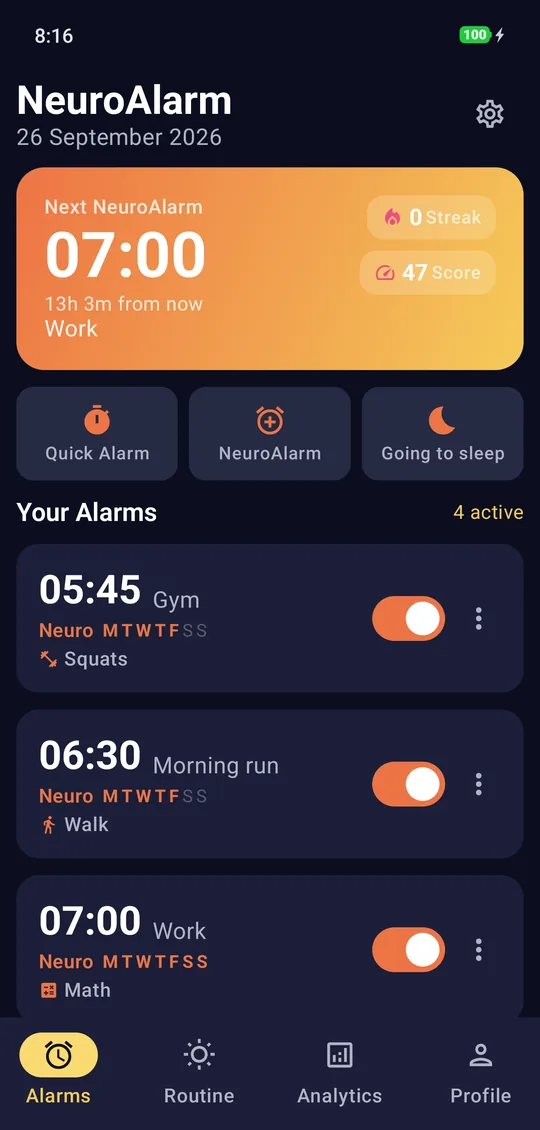
Everything a mission alarm does, minus the parts you were putting up with.
Two alarm modes: a clean Quick Alarm for reminders, and the full NeuroAlarm that will not quit until a challenge is done. 20 challenges across physical, mental and calm, each with its own difficulty, and compound alarms that chain a physical task with a mental one.
Reliability is engineered, not hoped for. Alarms survive reboot, Doze, force-kill and time changes, fire on a locked screen, and re-arm themselves after app updates. Optional uninstall protection uses Android's device-admin API so a groggy you cannot delete the app mid-ring. Every ringing alarm still has an Emergency Dismiss, a typed accountability phrase, for the mornings that genuinely are an emergency.
Wake Insights gives you a weekly wake score, streaks and snooze counts, computed on the phone. Ten hand-tuned themes, sunrise simulation, Smart Wake and a 30-Day Wake Reset programme round it out. Android 8.0 and newer.
What to look for in any mission alarm.
Use this list on NeuroAlarm, on Alarmy, on anything. The right app is the one that passes the questions that matter to you.
Questions about the missions
- Can the mission be completed without leaving the bed? If yes, it is a puzzle, not a mission.
- Does it verify with sensors (GPS, barometer, accelerometer, camera), or does it take your word for it?
- What happens if you run a fake-GPS app, take the elevator, or shake the phone lying down?
- Can you chain a physical and a mental task on the same alarm?
- Is there an emergency exit for genuine emergencies, and is it slow enough not to become a habit?
Questions about the app itself
- Does it show ads, and where? An ad on the ring screen is an ad shown to a half-conscious person.
- Does it require an account, and what is that account for?
- What data leaves the phone, and to whom? Read the privacy policy, not the store blurb.
- Does it survive a reboot, battery optimisation and a force-kill? Test it on a night you can afford to.
- Is the pricing a one-off, a subscription, or ads forever? Decide which you would rather live with.
Where NeuroAlarm is not the right pick.
If you are happy with an ad-supported app and your missions work for you, there is no reason to move. NeuroAlarm is Android-only, so iPhone users are out of luck. The challenges are a subscription rather than a one-off purchase, and if you would rather pay once or watch ads, that is a legitimate preference. There is no import from other alarm apps, and no social feed of wake-up times.
Where NeuroAlarm earns the switch is when you have concluded that the problem was never the missions, it was the escapes: the saved photo, the shake in bed, the ad that appeared at the worst moment, the account you never wanted. It was built to close those, on-device, with nothing collected. If that is the problem you have, start the 7-day trial, set the Walk challenge for tomorrow, and see whether you are still in bed at 6:05.
Full details of what the app does and does not do with your data are in the privacy policy.
Switching, answered.
NeuroAlarm is free to install, and Quick Alarm plus the Math and Squats challenges stay free forever with no ads. The other 18 challenges are part of NeuroAlarm Pro: monthly, yearly with a 7-day free trial you can cancel at any point, or a one-time lifetime purchase, billed by Google Play. There is no ad-supported tier because there are no ads at all.
No. NeuroAlarm has no account, no sign-in and no email field. Install it, set an alarm, pick a challenge. Your alarms and wake history live in a local database on the phone and never leave it.
Beyond the usual math and photo missions it has sensor-verified physical challenges: a 100 m GPS walk that rejects fake-location apps, a stair climb that uses the barometer so an elevator fails, squats counted by the accelerometer, a run that rejects vehicle speeds, a QR scan, a voice-volume check and a step counter. Plus Stroop, Flanker, memory, pattern, anagram, captcha, trivia, reaction time and a 4x4 Sudoku on the mental side, and a breathing challenge for calmer mornings.
It is built to survive reboots, Doze, force-kill and time changes, and it offers optional uninstall protection through Android's device-admin API. No Android app can stop you powering the phone off entirely, and any app that claims otherwise is overstating it. What NeuroAlarm does is make every escape slower than doing the challenge.
No. There is no import from other alarm apps. In practice most people have two or three alarms, and setting them up with a challenge each takes a couple of minutes.
Try the switch for a week.
Free to install, no account, no ads. Quick Alarm, Math and Squats are free forever; the other 18 challenges are yours to try free for 7 days.