 NeuroAlarm
A QR code alarm that puts the off-switch in another room.
Stick a QR code on the bathroom mirror. When NeuroAlarm rings, the only way to stop it is to stand in front of that mirror and scan it. The alarm cannot be dismissed from bed, because the thing that dismisses it is not in the bedroom.
Two minutes of setup, then it runs itself.
1. Print a code, stick it far away
Any QR code from any free generator works. Tape it to the bathroom mirror, the kettle or the front door. Somewhere you cannot reach without standing up and leaving the room.
2. The alarm rings with the camera open
The ring screen takes over the lock screen with a live camera preview and the Scan QR Code challenge. There is no swipe-to-dismiss and no way back to the home screen.
3. Scan it and it stops
Point the phone at the code. The on-device barcode reader recognises it in a fraction of a second and the alarm ends. You are standing up, in another room, with the light on.
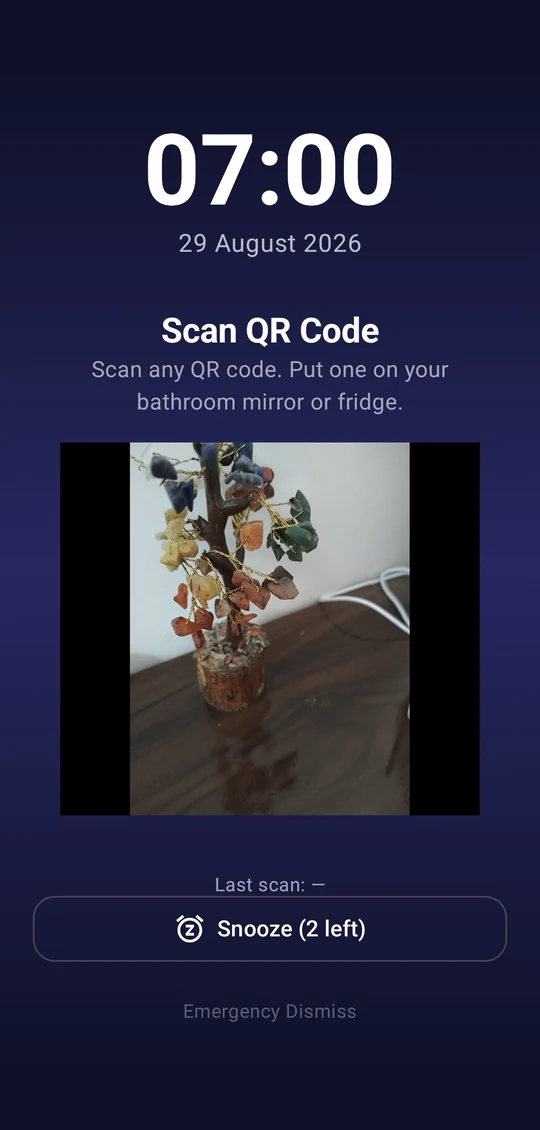
The most reliable camera challenge there is.
Photo-recognition alarms ask you to photograph a sink or a toothbrush and then guess whether the picture matches. In poor morning light, with a groggy hand, that guess is often wrong in both directions: it lets you off with a photo of the duvet, or it refuses the real sink three times in a row. Either way you lose trust in the alarm.
A QR code is binary. It either decodes or it does not. There is no model deciding whether your bathroom looks enough like a bathroom. That makes the QR Scan challenge the one camera challenge in NeuroAlarm you can rely on every single morning, in any language, on any Android 8.0+ phone with a camera.
Want it locked to your code only? Type a phrase into the alarm's QR Code Match setting and only a code containing exactly that text will end the ring. Leave it blank and any QR code counts.
Put the code where the morning should start.
The challenge is only as good as where you put the code. Think about the first useful thing you want to do after waking, and tape the QR to that.
- Bathroom mirror. The classic. Getting there means standing up, walking, and probably turning a light on.
- Kettle or coffee machine. Scan, then fill it. The alarm hands off directly into the routine.
- Front door or car keys hook. For people who need to be out early and want the alarm to end at the exit.
- Downstairs, if you sleep upstairs. A flight of stairs at 6 am does more for wakefulness than any ringtone.
- The dog's lead. If a walk is non-negotiable anyway, make it the off-switch.
Two rules. Do not keep a copy of the code on your phone or a second screen in the bedroom, because a code that can be scanned from bed is not a challenge. And print it at a decent size, roughly 5 cm or larger, so a sleepy hand can get a lock on it without hunting.
If you want a challenge that is physically impossible to game from the bedroom, the Walk to Dismiss challenge uses GPS and rejects fake-location apps, and Stair Climb cross-checks a barometer against your step count so an elevator does not count. NeuroAlarm lets you set a different challenge per alarm, or chain a physical and a mental one together in a compound alarm.
The camera preview runs only while the alarm is ringing. Frames are decoded on the device by a bundled barcode model and thrown away. Nothing is saved, nothing is uploaded, and there is no account behind any of it. Details are in the privacy policy.
QR code alarms, answered.
No. Any QR code works by default: print one from a free generator, or use one you already have. If you want to make sure only your code counts, type an expected text into the alarm's QR Code Match setting and the scanned code's content must match it exactly.
Technically a code on a second screen can scan, which is why the advice is to keep the code somewhere you must physically go, and not to keep a copy on your phone. If you want a challenge that is harder to game from bed, the Walk Distance and Stair Climb challenges are sensor-verified and cannot be satisfied without moving.
Somewhere that forces the routine you want: bathroom mirror, kettle, coffee machine, the front door or the dog's lead hook. The further it is from the bed and the more it lines up with the next thing you would do anyway, the better it works.
Scanning needs enough light for the camera to see the code, so stick it where you will have a light on, or turn one on when you get there. That is a feature: switching on a light is one more thing that makes going back to sleep less likely.
No. Frames are analysed live on the device with a bundled on-device barcode model and discarded immediately. No image is saved, and nothing is sent anywhere. NeuroAlarm has no account, no ads and no analytics.
Print the code tonight. Scan it tomorrow.
Free to install, no account, no ads. Quick Alarm, Math and Squats are free forever; QR Scan and every other challenge are yours to try free for 7 days.